Filesystem
Immich stores two types of content on disk:
- original, unmodified assets (photos/videos) and
- generated content (thumbs, transcoded media, etc.).
I recommend backing up the entire contents of UPLOAD_LOCATION, but only the original content is critical, stored in:
UPLOAD_LOCATION/libraryUPLOAD_LOCATION/uploadUPLOAD_LOCATION/profile
CAUTION
Heads‑up If you back up only those three folders, you’ll need to re‑run transcoding and thumbnail generation for all assets after restore. In this guide we back up the entire master folder to avoid unnecessary extra load on the system.
CAUTION
Caution If you moved any of these folders to a different disk (e.g.,
profile/), adjust paths accordingly.
Standard folder structure (Docker)
Master folder: <MASTER_DIR> (e.g., /volume1/docker/immich)
<MASTER_DIR>/cache
<MASTER_DIR>/db
<MASTER_DIR>/micro
<MASTER_DIR>/redis
<MASTER_DIR>/upload      # <<< Most important: if you lose this, your data is gone.
Before you continue
- Make a backup of the complete <MASTER_DIR> folder using The 3-2-1 Backup Method.
- Verify
<MASTER_DIR>/upload/backupscontains DB dump files. It should look like this: 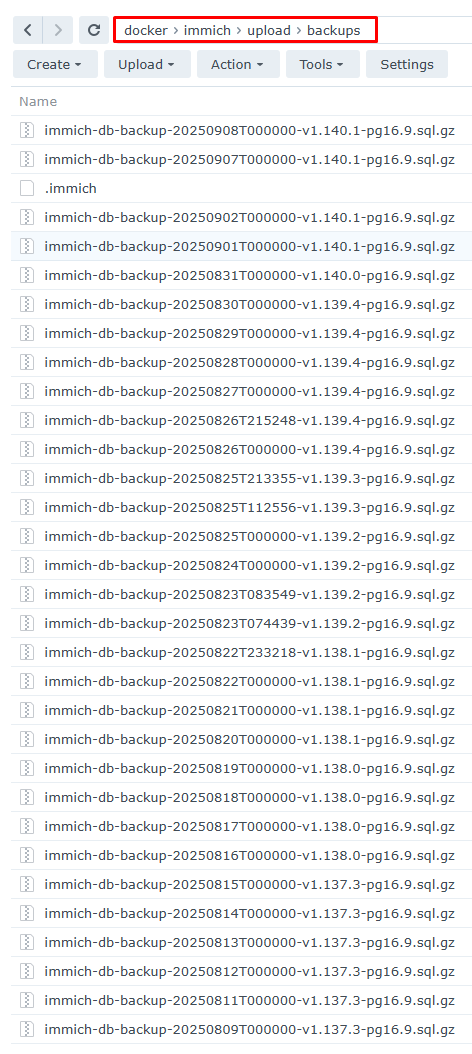
- Ensure your new instance has the same folder structure, and you’ve copied your master files to the new host/volume as needed.
Next: Part 4. Immich backup restore - Restoring your Database
TIP